Hearing aid accessories including a black Oticon remote control and a wireless adapter with colored connection ports.

Connect your Oticon hearing aid to your phone, TV and more

If you have an Oticon hearing aid with Bluetooth® functionality, these 5 accessories will improve the quality of your sound experience when making phone and video calls, watching TV, and participating in conversations.

Learn more about each device

Image shows ConnectClip
ConnectClip
Make hands-free phone calls and stream sound to your hearing aids
Learn more
A black and gray rectangular Oticon device lays flat against a plain white background, designed for hearing aid connectivity and streaming, with 'Oticon' branded subtly on the top surface.
TV Adapter
Stream the sound from your TV directly into your hearing aids
Learn more
Image shows Remote Control
Remote Control
Discreetly control sound and programs on your hearing aids
Learn more
Image shows EduMic
Edumic
Transmit audio or a speaker’s voice into your hearing aids.
Learn more
Image shows Phone Adapter
Phone Adapter
Connect your hearing aids to your landline phone
Learn more
Black over-ear headphones featuring control buttons, wireless earbuds marked with 'L' and 'R,' a slim charging dock, and a compact carrying case, displayed against a white background.
Headphones & earbuds
Enhance your listening experience in challenging situations
Learn more

TV Adapter

Stream the sound from your TV directly into your hearing aids

Man sitting on a couch using a TV adapter to enhance hearing device connectivity while watching television.

Using the TV Adapter, you can connect your hearing aids wirelessly to your TV and hear stereo sounds directly in your hearing aids. You can set the volume to your preferred level while others watching with you can listen at their own volume (the “original” volume setting on the TV). The device offers rich and clear sounds that match the visuals on your TV screen.

How to hear TV sounds in your hearing aids using the TV Adapter: Watch how-to video 


Tip for using the TV Adapter

If you have multiple TV Adapters in your house and your hearing aid is compatible with multiple TV Adapters, you can use the Oticon ON App to switch and start streaming from a new TV Adapter when you move to another room.

Woman consulting with a hearing care professional while exploring hearing aid options.

Begin your journey to better hearing today: Book a free appointment

Complete the steps below. Use the form below or quote the 'Audika' website when booking your appointment. All fields required.

By submitting online form, you agree to Audika's Privacy Policy.

ConnectClip

Make hands-free phone calls and stream sound directly into your hearing aids

Woman using ConnectClip during a video call, shown alongside a close-up of the ConnectClip device.

The ConnectClip is many things in one. With this versatile device, your hearing aids serve as wireless headphones, and the ConnectClip functions as a remote microphone. ConnectClip can be used as the following:

  • Wireless headset: The ConnectClip transmits sound directly from your smart device to your hearing aids, while its built-in microphone clearly delivers what you say. This improves the sound quality for both you and your friends on the other line.
  • Remote microphone: To better hear a speaker during a presentation, place the ConnectClip close to the person you wish to hear. Learn how to use the ConnectClip as a remote microphone: Watch how-to video 
  • Remote control for your hearing aids: Adjust the volume or change programs discreetly
 

Tip for using the ConnectClip

Oticon Bluetooth hearing aids can be used as high-quality, stereo headphones to stream audio directly to your hearing aids from Apple devices (without the use of the ConnectClip). However, even if you have an iPhone, you can still benefit from using a ConnectClip as a remote microphone or for making hands-free calls.

Find a hearing care expert in your area

Phone Adapter

Connect your hearing aid to your landline phone

Woman using phone adapter with connected device placed nearby

The Phone Adapter connects your landline phone wirelessly to the ConnectClip device (mentioned above.) During a call, your hearing aids become the headset, and the ConnectClip, attached near your collar, functions as a microphone. This means that you don’t have to worry about experiencing noisy feedback or running to pick up the phone when it rings.

Note: You will also need a ConnectClip device along with your Phone Adapter.


Tip for using the Phone Adapter

When connected to the Phone Adapter, you'll hear an incoming call alert through your hearing aids whenever the landline phone rings, so you can rest assured that you won't miss a phone call.

EduMic

Transmit audio or a speaker’s voice into your hearing aids.

Woman using EduMic device while teaching a classroom of young students.

EduMic transmits audio or a speaker's voice directly into your hearing aids. It provides a clear, high-quality sound experience and can be used as the following:

  • Remote microphone – Transmits a speaker’s voice directly into your hearing aids
  • Telecoil receiver – Captures audio from public hearing loop systems and sends it to your hearing aids
  • Media streamer – Sends audio from your computer, tablet, or TV directly into your hearing aidsi
 

Tip for using the EduMic

EduMic clips easily onto clothing and can be worn on a lanyard, where it looks sleek and discreet.

Remote Control

Discreetly control your hearing aids

Man adjusting hearing aid with a remote control.

With the small size of a modern car key, this small remote control allows you to do the following on your hearing aids:

  • Adjust the volume
  • Switch between programs
  • Mute/unmute your device

Keep the remote control in your pocket and adjust your hearing aid whenever you need to.

How to connect your hearing aids to the Remote Control: Watch how-to video 


Tip for using the Remote Control

The Remote Control should first be paired to your hearing aids for it to work. Your local hearing care expert can set this up for you.
Request a call back

Easy LE Adapter

Enjoy seamless two-way, hands-free phone calls

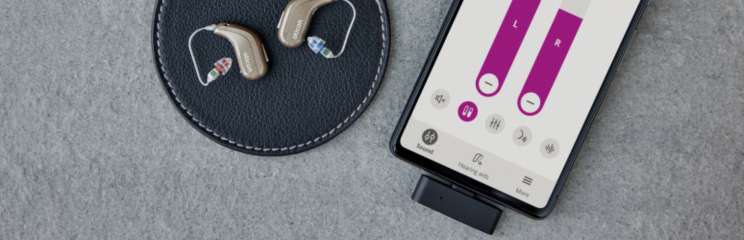
Two beige Oticon hearing aids rest on a circular black leather pad beside a smartphone displaying a hearing aid control app with volume sliders labeled 'L' and 'R' on a gray surface.

The Easy LE Adapterii  provides Android™ users with seamless two-way, hands-free phone calls. Specifically designed for older devices lacking Bluetooth® LE audio, this adapter ensures Oticon Intent wearers enjoy high-quality audio streaming. 
To start streaming, simply plug it into the USB-C port at the bottom of your Android phone and pair with Intent hearing aids.

Oticon On app interface displayed on a smartphone held by a person.

Oticon ON - Get the smartphone app 

You can control your hearing aids from your smartphone using Oticon ON. You can adjust the volume, switch between programs, check the battery level, and more.

The app can also be used to adjust the sound on other devices such as Oticon’s TV Adapter, ConnectClip and EduMic.

Download Oticon ON

Headphones & earbuds

Specialised devices offering direct audio streaming to enhance your listening experience

A woman wearing headphones holds a child clutching a stuffed elephant in a cozy, home-like environment with white-paneled walls and shelves with books in the background. No visible text.

If you find it difficult to hear clearly in certain situations such as watching TV, talking on the phone, or following conversations in noisy environments, an assistive listening device may be helpful. These devices are designed to provide support in specific moments and depending on the device, may be used with or without hearing aids.

A pair of compact black hearing aids sit in an open charging case with visible control buttons (+, -) and a glowing green LED indicator, suggesting functionality and readiness for use.Earbuds

Not a hearing aid. A listening aid with sound personalised to your unique hearing profile. Helping you better engage in conversation and enjoy an enhanced audio experience.


Black over-ear headphones rest on a white background, featuring cushioned ear cups, control buttons on the side, and a sleek logo resembling a fingerprint on one ear cup. No text visible.The A-02 Headphones can be used with your hearing aids, and use a health check algorithm to tailor sound to your unique hearing profile. Including features like active noise cancellation, Bluetooth® connection, in-built microphone, simple switch operation and made with superior durability, these headphones are the ultimate assistive listening device for hearing health.


Over-ear black headphones with cushioned ear cups display volume and control buttons on the side, accompanied by a slim rectangular black transmitter with three indicator lights, placed below.Purposefully designed to improve your listening experience while watching your favourite show, the A-02 TV Bundle is the perfect way to hear the TV better, without disturbing others. The bundle includes a pair of the A-02 Headphones and an Audeara TV Streamer, a compact and easy-to-use Bluetooth® audio streamer that plays audio wirelessly from your TV, sound bar or stereo system.


 iAdditional accessories may be required

iiMost phones and tablets with a 3.5 mm audio jack will not work with the adapter, as many manufacturers choose to route the audio through the audio jack rather than the USB-C.